
Managing Devices at Scale
Launching your smart connected product is an achievement, but it's also just the beginning in many ways! The real test comes when you're managing hundreds or thousands of devices in the field, responding to customer issues, and keeping your fleet healthy over time. How you operate your fleet affects everything from support costs to customer satisfaction to your ability to ship new features.
Effective fleet operations affect everything from support costs and operational efficiency to customer satisfaction and product reliability. Without the right operational practices in place, even well-designed products can become difficult to support at scale.
 note
noteKey Takeaways
- Organize devices into clear fleet structures to simplify operations and updates.
- Monitor fleet health automatically using inactivity detection, alerts, and dashboards.
- Enable remote diagnostics using device metadata, session data, and environment variables.
- Use staged firmware rollouts to reduce the risk of fleet-wide failures.
- Automate device lifecycle management including onboarding, configuration, and decommissioning.
- Use batch operations for fleet administration instead of managing devices individually.
In This Guide
This guide outlines operational patterns for managing connected device fleets at scale using Blues Notehub:
- Fleet Organization: Designing a fleet structure that supports operational workflows, staged rollouts, and efficient device management.
- Monitoring and Observability: Detecting inactive devices, monitoring abnormal behavior, and building dashboards for fleet health visibility.
- Remote Troubleshooting: Using device metadata, session data, and environment variables to diagnose issues without physical access.
- Firmware Management at Scale: Safely deploying over-the-air firmware updates using staged rollouts.
- Device Lifecycle Management: Managing device onboarding, operational stages, and decommissioning as fleets evolve.
- Batch Jobs at Scale: Using batch operations to update configuration, manage fleets, and generate reports across large numbers of devices.
- Device Operations Checklist: A checklist covering fleet organization, monitoring, firmware management, and lifecycle management.
Fleet Organization
How you organize devices directly affects how easily you can monitor, troubleshoot, and update your fleet at scale. As deployments grow, clear device grouping becomes essential for targeted configuration changes, staged firmware rollouts, and efficient operational workflows.
In Notehub, fleets serve as the primary grouping mechanism, providing logical organization along with operational capabilities such as fleet-level environment variables and targeted firmware updates.
Choosing a Fleet Structure
The Cloud Architecture Guide covers the four common fleet organization patterns: by deployment stage, by customer or site, by device status, and by geography. If you haven't settled on a pattern yet, review that guide first.
At scale, most production deployments combine these patterns rather than relying on a single dimension. You might have top-level separation by deployment stage, with customer or geographic segmentation within your production devices. A B2B product with global customers might use geography at the top level, customer within each region, and deployment stage within each customer.
The key operational consideration is that changing your fleet strategy is disruptive at scale. Moving a handful of devices between fleets is trivial; restructuring thousands of devices requires batch operations, route reconfiguration, and downstream system updates. If your current structure is working but imperfect, weigh the cost of migration against the benefit of a cleaner organization before committing to a restructure.
Not every categorization needs a formal fleet.
Device tags provide a
lightweight alternative for ad-hoc grouping without the overhead of fleet
management. Tags automatically update a reserved _tag
environment variable
on the device, making them queryable via the
Notehub API.
Tags work well for temporary classifications, like devices being monitored for a specific issue. Unlike fleets, tags don't support fleet-level environment variables or targeted firmware updates, so use them for organization and filtering rather than operational control.
Smart Fleets for Automatic Organization
The Cloud Architecture Guide introduces Smart Fleet rules and how JSONata expressions can help automate device organization. At scale, Smart Fleets shift the manual fleet assignment burden that simply isn't sustainable when you're managing numerous devices.
When designing Smart Fleet rules for production, focus on rules that drive
operational workflows. The three core functions: $addToFleet(),
$removeFromFleet(), and $leaveFleetAlone(), let you build layered logic
where devices move between fleets based on real-time conditions. A device might
be "Operational" one minute and "Requires Attention" the next, based on its
actual behavior rather than manual intervention.
noteEffective operational patterns include moving devices to a low-battery fleet when voltage drops below a threshold, surfacing devices that haven't reported data recently, and flagging devices whose sensor readings fall outside expected ranges.
Monitoring and Observability
You can't manage what you can't see. Effective fleet operations require visibility into device health, connectivity status, and data quality across your deployment. As fleets grow, it becomes impractical to manually inspect individual devices. Instead, teams need systems that automatically surface devices requiring attention and highlight fleet-wide trends.
Notehub provides several mechanisms to support production monitoring, including inactivity detection, threshold-based alerts, and operational dashboards.
Watchdog Events for Inactivity Detection
The Cloud Architecture Guide explains how watchdog events work and why they're essential for production monitoring. Here, we'll focus on using them operationally.
The real power of watchdog events comes from
combining them with Smart Fleet rules
for automated triage. A rule like "if the event is from _watchdog.qo,
add to the Inactive fleet; otherwise remove from Inactive" automatically
surfaces devices needing attention. Instead of scanning thousands of devices,
your operational workflow becomes checking the Inactive fleet.
Notehub Alerts for Threshold Monitoring
Beyond inactivity detection, you need visibility into data anomalies. Notehub alerts let you define threshold-based monitors on any field in your event data, triggering notifications when values exceed boundaries.
Alerts support various comparison operators applied to specific body fields in your event JSON (e.g. greater than, less than, and equal to). When a threshold is crossed, Notehub can send notifications via email, Slack, or SMS. You can also disable alerts temporarily during maintenance windows or when investigating known issues.
Building Operational Dashboards
Alerts tell you when something needs immediate attention; dashboards tell you how your fleet is doing overall. Most production deployments route data to downstream systems where they build visualizations showing fleet health trends, geographic distribution, data quality metrics, and usage patterns.
noteHave your engineering team consult Blues' extensive routing tutorials to examine a variety of data visualization options from popular cloud platforms.
Example data visualization dashboard from Blynk.
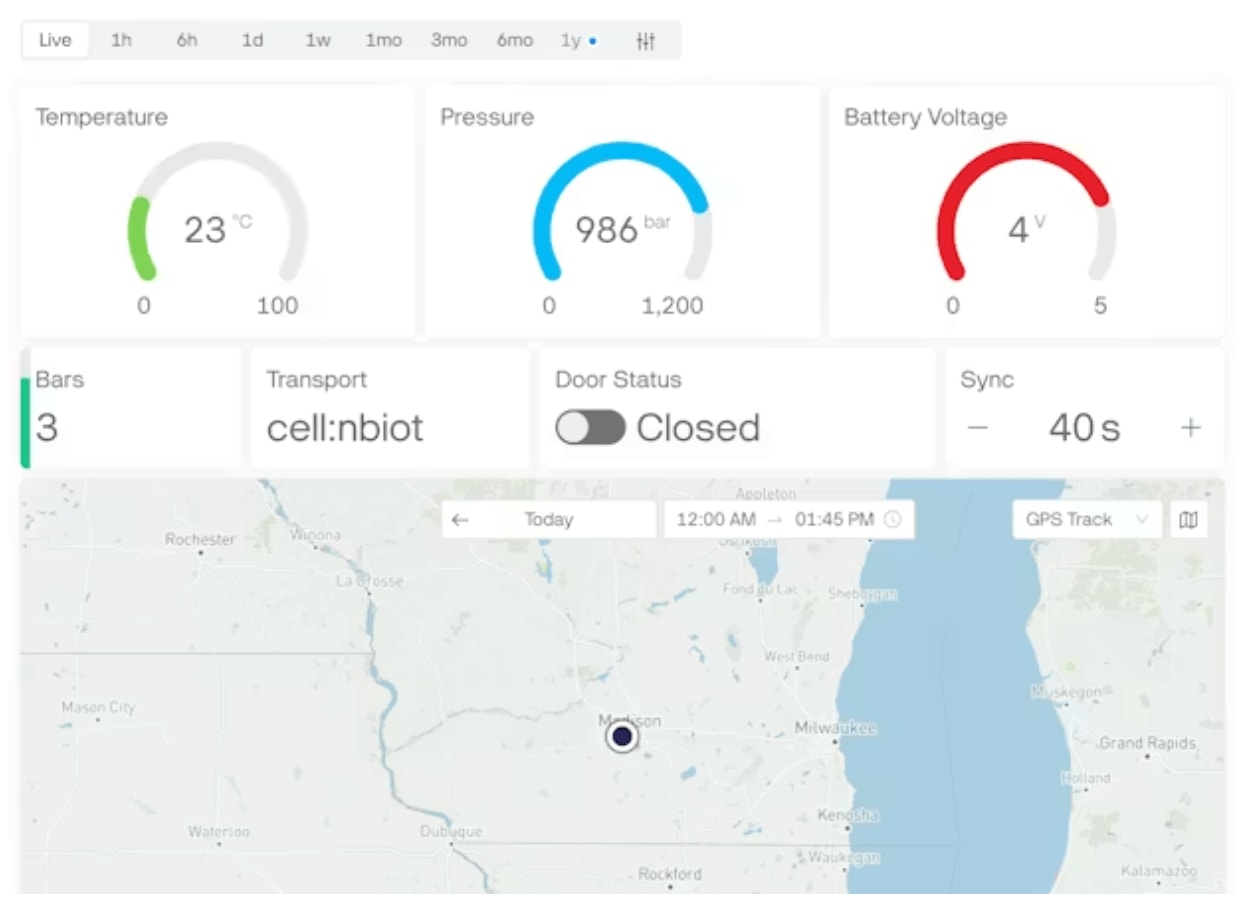
Essential dashboard views typically include a device health summary showing geographic distribution on a map, battery status distribution across your fleet, connectivity quality over time, and firmware version distribution. These views help you understand fleet-wide trends and identify emerging issues before they become support tickets.
Remote Troubleshooting
When issues arise (and they will!) your ability to diagnose and resolve them remotely determines whether you send a truck or (preferably) send a firmware update. Notehub provides several mechanisms for remote investigation.
Device Information and Session Data
Every device in Notehub maintains rich metadata about its state and connectivity history. Device information includes unique device ids, firmware versions, radio used, and location data. Session information shows connectivity history like when the device connected, how long sessions lasted, what data was transferred, and any errors encountered.
This information is often enough to diagnose the root cause of common issues. For example, a device showing short session durations and frequent reconnects might have poor cellular coverage. A device with outdated firmware might be experiencing a bug you've already fixed. A device that successfully connects but sends no data might have a sensor failure.
The raw event data is also valuable. You can view the actual JSON payloads your device has sent, verifying that data formats match expectations and values are within bounds. When a customer reports incorrect readings, comparing their device's raw events against working devices often reveals the issue.
Environment Variables for Remote Diagnostics
Environment variables aren't just for configuration, they can also be powerful diagnostic tools. By designing your firmware to respond to environment variables, you create remote "knobs" you can turn without pushing firmware updates.
A common diagnostic pattern is to use the _log.qo
Reserved Environment Variable
to include additional logging data from one or more devices as they connect to
Notehub (helpful for debugging but too expensive data-wise to leave on
permanently!).
The hierarchy of environment variables, by providing device, fleet, and project levels, makes this practical at scale. Set a project-wide default, override it for a specific fleet during testing, and further override for individual devices during troubleshooting. When the investigation is complete, remove the device-level override and the device returns to normal behavior.
Common Issues and Resolution Patterns
Experience assisting our customers with real deployments has helped to reveal some recurring patterns! Understanding these common failure modes can help teams diagnose problems more quickly when they arise.
Connectivity issues often stem from poor cellular coverage, antenna placement problems, and/or inappropriate antenna selection. Be sure to check session data for connection patterns, verify the device's location against known country support in the Notecard datasheets, and ensure connectivity assurance is enabled.
Data quality issues like incorrect readings, missing data, or format problems, usually end up being sensor failures, firmware bugs, or environmental factors the firmware wasn't set up to handle. Compare the affected device's raw events against known-good devices, check for firmware version differences, and look for patterns in when the issues occur.
Power issues manifest as devices going offline unexpectedly (e.g. "brown out" messages in Notehub) or reducing sync frequency due to the usage of voltage-variable sync behaviors. Check battery voltage trends, verify the power budget assumptions still hold, and look for changes in the deployment environment that might affect solar charging or power availability.
Firmware update failures appear as devices stuck on old versions or repeatedly failing DFU. Check the device's DFU status for error messages, verify network connectivity is sufficient for downloading updates, and ensure the device has adequate battery to complete the update process.
Firmware Management at Scale
Over-the-air firmware updates are essential for maintaining and improving connected products after deployment, but they carry risk. A bad update pushed to your entire fleet could take down thousands of devices.
For this reason, the cardinal rule of firmware management is simple:
Never update your entire fleet simultaneously.
Using Notehub and Notecard Outboard Firmware Update workflow allows teams to safely manage firmware updates across large deployments.
Staged Rollout Strategies
Staged rollouts reduce risk by updating progressively larger groups, monitoring for problems at each stage before proceeding.
A typical rollout sequence includes:
- Internal test devices used by the engineering team
- A canary fleet consisting of a small subset of production devices
- Early adopters or trusted customers who opt into early releases
- General availability across the full fleet
Fleet structure in Notehub enables this directly. Create fleets for each rollout stage, move devices into the appropriate fleet, and target firmware updates at the appropriate fleet(s).
Remember that a single Notecard device can belong in multiple fleets simultaneously in Notehub!
The Notehub API supports this workflow programmatically. You can query device firmware status across fleets, initiate updates for specific fleets, monitor progress, and cancel updates if problems emerge.
Voltage-Variable Updates for DFU
Devices that lose power mid-update can be difficult to recover. Voltage-variable DFU prevents this by refusing to start updates when battery voltage is too low, ensuring devices have sufficient power to complete the update process.
Configure this ahead of time through firmware, specifying a minimum voltage threshold below which updates won't be initiated. A device with low battery will skip the update attempt, continue operating normally, and try again when battery conditions improve.
Monitoring Update Progress
Visibility into update progress is essential during rollouts. Notehub tracks firmware update status for every device, showing current version, pending updates, download progress, and completion status. You can see whether a device is waiting to start, actively downloading, ready to apply, or has completed the update.
Build dashboards that show rollout progress across your fleet: how many devices have completed the update, how many are in progress, how many have failed. Alert on update failures so you can investigate before they become patterns.
Update history is also valuable when diagnosing issues through Notehub. When troubleshooting a device issue, knowing what firmware updates it has received (and whether any failed) often provides context for the problem.
Device Lifecycle Management
Devices move through stages from initial deployment to eventual decommissioning. Managing this lifecycle efficiently prevents operational chaos as your fleet grows.
Onboarding New Devices
When new devices first connect to Notehub, they land in the "default" fleet. For small deployments, manual configuration is fine. At scale, you need automated onboarding workflows.
Batch jobs in Notehub enable bulk device configuration, setting environment variables, fleet membership, and other properties for groups of devices. You can define jobs that run on devices matching specific criteria, applying consistent configuration without manual device-by-device setup. See below for more in-depth information on batch jobs in Notehub.
Provisioning workflows let you define default configuration that's applied when devices first connect. Combined with Notecard's supplied QR codes and scanning at deployment time, this creates a streamlined onboarding path with minimal manual intervention.
Decommissioning Devices
Devices eventually reach end of life - whether because customers cancel service, hardware becomes obsolete, or you're transitioning to new product versions. Clean decommissioning prevents operational clutter and ensures you're not paying for services on devices that are no longer active.
Move decommissioned devices to a dedicated fleet in Notehub where they're clearly separated from operational devices. Disable or block connections to prevent decommissioned devices from consuming resources. Archive any data required for compliance or warranty purposes before removing devices from active tracking.
Batch Jobs at Scale
Individual device management doesn't scale. As deployments grow, teams need the ability to update configuration, reorganize fleets, and generate reports across hundreds or thousands of devices simultaneously.
Bulk Configuration Updates
Notehub's batch job system enables operations to be performed across large groups of devices in a controlled and repeatable way.
Device selection can target:
- All devices in a project
- Devices in specific fleets
- Devices identified by unique DeviceUID
- Devices identified by serial number
Common operations include setting environment variables, joining or leaving fleets, enabling or disabling devices, and configuring connectivity assurance settings.
Batch jobs run asynchronously, meaning you submit the job, and Notehub processes it in the background. Job status shows progress and completion, and you can download reports showing what happened to each device. This is essential for operations that would take hours if done device-by-device.
Support for "dry runs" lets you test batch jobs before execution. The dry run shows what would happen without actually making changes, catching configuration errors before they affect your fleet.
Generating Fleet Reports
Operational visibility requires regular reporting. Batch jobs can generate reports on device information, activity, health, and configuration across your fleet or selected subsets. These reports support compliance audits, management dashboards, and operational analysis.
Common reports include:
- Device inventory reports showing deployed devices and firmware versions.
- Activity reports showing communication frequency and data usage.
- Health reports including battery status and connectivity quality.
- Configuration reports showing environment variables and fleet memberships.
These reports support operational monitoring, compliance audits, and fleet analysis, giving teams visibility into the overall state of their deployments.
Device Operations Checklist
Before declaring your fleet operational, verify you've addressed these areas.
Fleet Organization
- Fleet structure defined that aligns with operational workflows
- Smart Fleet rules configured in Notehub for automatic device categorization
- Device tagging strategy documented for lightweight organization
- Default fleet configured appropriately for new device onboarding
Monitoring
- Watchdog events configured for inactivity detection
- Alerts configured for critical thresholds (battery, temperature, errors)
- Operational dashboards built showing fleet health and trends
- Data routing configured to downstream analytics systems
- Environment variables designed for remote diagnostics
Firmware Management
- Staged rollout process defined with fleet structure
- Voltage-variable updates configured to prevent low-battery updates
- Update monitoring dashboards built
Lifecycle Management
- Onboarding workflow automated for new devices
- Decommissioning process defined with archival procedures
- Batch job templates created for common bulk operations
Resources and Next Steps
With your fleet operations established, you're ready to support your connected product at scale. The following resources provide deeper guidance on specific topics.
Blues Resources
- Notehub Fleet Administrator's Guide
- Notehub Walkthrough
- Configuring Notehub Alerts
- Running Batch Jobs
- Using Smart Fleet Rules
Getting Help
If you have additional questions about device operations for your Blues-based product:
- Post questions on the Blues Community Forum
- Contact Blues sales for enterprise-level support