Notehub IQ: Use AI to Talk to Your Products
August 19, 2026
See a live demo of Notehub IQ where you can ask questions of your connected products' data in plain language (no SQL, dashboards, or data pipelines required!).
Webinar Summary
The following summary is auto-generated from the webinar recording.
In a recent Blues webinar, Rob Lauer, TJ VanToll, and Alex Bucknall introduced Notehub IQ, a new intelligence layer for Notehub that lets teams ask natural-language questions about their connected products.
That framing matters because most IoT teams are not short on data. They are short on time, clean access paths, and fast answers. Device events, connectivity metadata, voltage readings, firmware behavior, fleet state, and cloud-routing outcomes often live in systems that require dashboards, queries, exports, or custom internal tools to interpret.
Notehub IQ is designed to reduce that friction. It lets you use an AI agent to inspect product data already flowing through Blues and turn it into answers, visualizations, and eventually operational workflows.
From Device Data to Actionable Questions
Blues is built around simplifying low-power wireless connectivity for connected products. The Blues Notecard provides wireless connectivity for embedded devices and communicates securely with Notehub, which routes device data to your cloud application.
Notehub IQ builds on that foundation. Instead of asking teams to build yet another dashboard or export pipeline, it lets them ask questions like:
- Which devices used the most cellular data in the last 24 hours?
- What did AQI look like over the past day?
- Which devices have been silent for too long?
- Which devices appear to have a power issue versus a connectivity issue?
The important shift is that teams can interact with product data using plain language, while still relying on structured device events and Notehub metadata underneath.
This is especially useful for cross-functional connected-product teams. A firmware engineer might use it to investigate unexpected readings. A product manager might use it to explore behavior across a fleet. A support operator might use it to identify devices that need attention.
How Notehub IQ Works
At a high level, Notehub IQ currently consists of two Blues-managed components.
The first is a storage service that acts as a secure first-party data layer. It mirrors event data from Notehub and stores it in a way that is optimized for efficient querying.
The second is the Notehub MCP server. MCP stands for Model Context Protocol, and it provides the interface between an AI agent and Notehub IQ. AI clients that support MCP can use this server to ask questions, run queries, and return results.
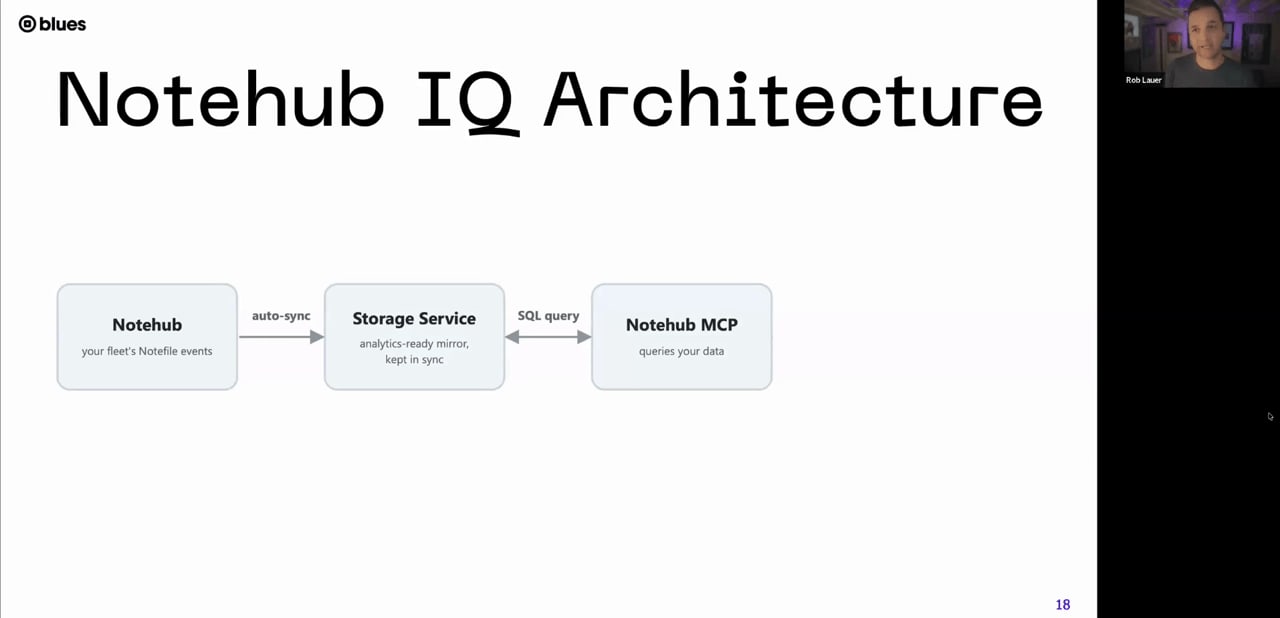
The webinar architecture slide showed how Notehub, the storage service, and Notehub MCP work together.
That architecture matters because the AI agent is not simply guessing at your data model. The Notehub MCP understands how Notecard and Notehub behave. For example, it knows where to look for session events when diagnosing connectivity, where voltage readings appear, and how to distinguish between the time a reading was stored on the Notecard and the time it was uploaded to Notehub.
That domain awareness helps produce more accurate answers than a generic AI agent inspecting raw data without context.
Getting Started with an AI Agent
In the webinar, the team demonstrated Notehub IQ primarily with Claude Desktop, which Blues currently recommends for the best experience. Other MCP-capable clients can also be used, including tools such as ChatGPT clients or code-focused AI tools that support MCP.
The setup flow is straightforward:
- Add the Notehub MCP connector in your AI client.
- Authenticate through Notehub using OAuth.
- Ask the agent to list the Notehub projects you can access.
- Select a project to onboard to Notehub IQ.
- Create a repository and define datasets.
For readers familiar with databases, TJ described repositories as roughly analogous to databases and datasets as roughly analogous to tables. In practice, datasets are filtered views of your Notehub event data.
A common starting point is to map datasets to
Notefiles. For example, an application
might have an air.qo Notefile for air quality readings and a
_session.qo Notefile for
connectivity and device metadata.
During onboarding, Notehub IQ can inspect Notefile schemas and draft datasets for you. You can accept the defaults or narrow the dataset to only the fields you care about.
Querying Product Data in Natural Language
Once a project is onboarded, the experience becomes conversational. In the demo, TJ queried a simple air quality project with one device and asked for a line chart of AQI data over the previous 24 hours.
The AI agent used the Notehub MCP tools to query the dataset, then generated a visualization from the returned data. The same pattern worked across a multi-device CO₂ monitoring project, where the agent was asked to chart readings for multiple devices and then refine the output to show one line per device.

The live demo showed CO₂ readings retrieved and formatted through a conversational interface.
This illustrates an important practical point: the data access path is structured, but the presentation layer is flexible. The MCP handles the query against Notehub IQ data. The AI client decides how to summarize, chart, or format the result.
That also means results can vary by AI client. You should expect the queried data to be consistent, but the visualization or summary produced by the LLM may differ depending on the model and tool you use.
Moving from Analysis to Operations
The most compelling part of the webinar was not ad hoc charting. It was the demonstration of Notehub IQ as part of a broader operational workflow.
Alex showed an internal Blues fleet called Songbird: a Notecard-based tracking application used by Blues teams. The fleet includes devices that move between locations, charge and discharge, and occasionally need maintenance.

The Songbird demo included a live dashboard view for monitoring devices across locations.
Using Notehub IQ together with other MCP-connected systems, Alex built a simple maintenance dashboard and workflow. The AI agent inspected the Songbird fleet, identified devices that appeared to need attention, mapped device states into Jira, and produced Slack-style operational updates.
The workflow could identify a device that had been silent for many days, check the last known voltage reading, and infer that the issue looked more like a connectivity problem than a power failure. A support operator could then use that information to decide what action to take.
This is where Notehub IQ becomes more than a reporting tool. It can help connected-product teams bridge the gap between device telemetry and the business systems where work actually happens.
Key Technical Takeaways
Notehub IQ is currently in public beta, and several technical details from the webinar are worth noting.
- Projects must be onboarded before their data can be queried through Notehub IQ.
- During beta, onboarding includes a backfill of up to 90 days of event data.
- New matching events are automatically included in the dataset after onboarding.
- Datasets can be scoped to specific Notefiles and fields.
- Query speed depends on dataset size, selected fields, and the complexity of the request.
- Authentication uses Notehub OAuth through the MCP client.
- Access is tied to Notehub project membership and permissions.
The team also emphasized that dataset design matters. If you only need voltage and signal strength from a session dataset, avoid loading every available field. Smaller, more focused datasets can improve query performance and reduce unnecessary data processing.
For implementation details, the Blues Developer Portal and Blues API reference are the best starting points for understanding how Notecard, Notehub, and related APIs fit together.
Product and Design Lessons
For product teams, Notehub IQ points to a broader design pattern: make product data explorable before you know every question your team will ask.
Traditional dashboards work well when the questions are known in advance. But connected products often produce new operational questions after deployment. A support issue, firmware change, environmental condition, or unusual data spike can force teams to investigate patterns they did not anticipate.
Natural-language analysis helps teams ask exploratory questions without waiting for a new dashboard. That does not eliminate the need for production reporting, alerting, or analytics systems. But it can reduce the gap between “we noticed something” and “we understand what is happening.”
It also makes IoT data more accessible to non-firmware teams without removing technical depth for engineers.
Notable Architecture Decisions
Several implementation choices stood out in the webinar.
First, Notehub IQ uses a Blues-managed storage layer rather than querying arbitrary live event history directly. This makes the data more efficient to query and gives teams a place to shape datasets for AI-assisted analysis.
Second, the MCP server understands Blues-specific device and event semantics. That context is critical for interpreting connectivity, voltage, timestamps, and session data correctly.
Third, Notehub IQ is currently read-focused. The webinar previewed future phases around managing fleets and assisting with build workflows, but the beta experience shown was centered on querying and analysis.
Finally, access control follows Notehub permissions. Users need appropriate access to the Notehub project, and repository creation requires elevated permissions. More granular access models and audit logging were discussed as useful feedback areas, but not presented as current features.
Try It with Real Product Questions
The best way to evaluate Notehub IQ is to bring it a project where the questions matter. Start small: onboard a project, map a few important Notefiles, and ask practical questions about device behavior, connectivity, power, or usage.
If you are new to Blues hardware and want to prototype a connected product, explore Blues products or browse available hardware in the Blues shop.
To go deeper, watch the webinar recording or learn more from Blues about how Notehub IQ can help your team turn connected-product data into operational insight.
