Notehub MCP
Notehub MCP is a hosted Model Context Protocol (MCP) server, and it's the interface to Notehub IQ, the intelligence layer for Notehub. It turns the plain-language questions you ask your AI agent into queries against the Notehub data you already collect, runs them, and reasons over the results.
You use the Notehub MCP through your own AI agent: the MCP-capable client you already run (e.g. Claude Desktop/Web, Claude Code, Codex, VS Code Copilot, Cursor, and others). Because the Blues storage service behind it is first-party, there is no separate data warehouse to feed. You decide which Notefile data to include and then query it conversationally. The Notehub MCP generates and runs the SQL for you and returns a response.
To try Notehub IQ in your browser before connecting your own agent, see the Using Notehub IQ tutorial.
Notehub MCP can make changes to your Notehub projects, but it always asks for your approval first. To limit your agent to read-only Notehub access, give it viewer privileges when you authorize it.
Installation
Notehub MCP is a hosted HTTP MCP server available at:
https://mcp.notehub.io/mcpThe quickest way to install Notehub MCP is to ask your AI agent to add it as a new HTTP MCP server.
Add a new HTTP MCP server named Notehub MCP using https://mcp.notehub.io/mcp.
The URL is intended for MCP client configuration and will not open as a webpage in your browser.
If your AI agent cannot complete the setup automatically, choose your tool or MCP client below and follow its installation instructions:
- Claude Desktop or Web (recommended)
- Claude Code
- GitHub Copilot (VS Code)
- Codex
- Cursor
You can install Notehub MCP by searching for “Notehub” in Claude’s Connectors directory.

Once the server is added, your AI agent needs your permission to access your Notehub account.
Authorize Notehub MCP
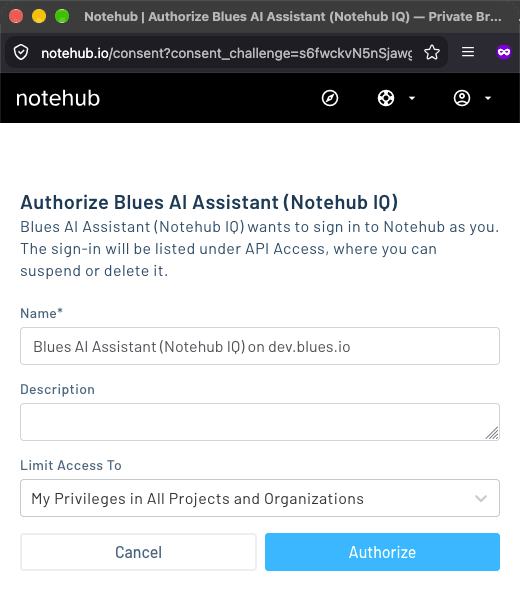
Because the Notehub MCP works with your own product data, you must authorize your AI agent to access your Notehub account. The first time your agent connects to the Notehub MCP, it opens a browser window where you:
-
Sign in to Notehub, if you're not already signed in.
-
Choose what your agent can access with the Limit Access To dropdown. You can give it access to all of your projects or restrict it to a single project:
- My Privileges options let your agent do anything you can do in Notehub, including making changes to your projects.
- Viewer Privileges options give your agent read-only access, so it can answer questions about your data but can't change anything.
Onboarding a project makes changes to it, so pick a My Privileges option the first time you connect. Once your projects are onboarded, you can reauthorize with a Viewer Privileges option if you want your agent to stay read-only.
-
Click Authorize.
Your agent reuses this authorization on later requests. You can suspend or delete its access at any time from Notehub's API Access page.
To confirm everything is working, ask your agent:
Is the Notehub MCP installed and available?
All interactions with the Notehub MCP are conversational: your AI agent calls the Notehub MCP's tools on your behalf based on what you ask.
Onboard a Project
Before you can ask questions about a Notehub project, you must onboard it and create datasets from its data. Work through these steps with your AI agent for each project you want to use with the Notehub MCP.
In order to onboard a Notehub project, you must be an "Owner" or "Developer" of the project. This is only for the onboarding step, as once a project is onboarded, any project member, including Viewers, can query the project.
-
Onboard a Notehub project. Ask your agent which projects you can onboard, and then onboard one:
PromptList which Notehub projects I can onboard.
PromptOnboard my [project name] project for use with Notehub MCP.
Onboarding automatically creates a repository for the project, the container in the storage service where your datasets live.
-
Create one or more datasets that will mirror your Notefiles' JSON events with queryable database tables. For example:
PromptCreate datasets for my sensors.qo, alert.qo, and command.qo Notefiles.
For your own Notefiles, your devices must have sent at least one event before you can create a dataset. Review the proposed columns before you confirm: a dataset's columns can't be edited later, only replaced, which reloads all of its data. Notehub then copies your existing events into each new dataset.
note Don't forget your System Notefiles. Questions about device metadata (signal strength, data usage, session behavior, voltage, location, and so on) can only be answered if a dataset exists for the System Notefile that carries it, like
_session.qo,_health.qo, or_track.qo. Datasets are only created for the Notefiles you ask for, so if you want to ask these kinds of questions, include those Notefiles too:PromptAlso create datasets for my _session.qo and _health.qo Notefiles.
-
When your datasets are ready (which can take minutes to hours depending on how much data you have), it's now time to ask questions! The MCP inspects the schema and runs read-only queries against your stored data to provide answers. For example:
PromptAre any of my devices showing anomalous temperature readings over the past 24 hours?
-
As time goes on, newly added data in Notehub gets automatically and immediately synced with your datasets. See below for examples on how to make the most out of Notehub MCP.
Organizing with Repositories
Your datasets live inside a repository, a container in the Blues storage service that is scoped to a whole project or to specific fleets within it. When you onboard a project, Notehub IQ automatically creates a repository for it, which by default covers the whole project, so for many deployments a single repository is all you ever need.
However, because a repository can be scoped to specific fleets, you can create
additional repositories against the same Notehub project, each covering a
different set of fleets. For example, in a project that spans multiple regions,
you might keep one repository for your west-region fleet and another for
east-region, so each can be queried independently. Just ask your AI agent:
Create a repository scoped to my west-region fleet, and another for my east-region fleet.
Example Usage
Every Notehub project is different, but here are some examples of questions you can ask the Notehub MCP of your datasets:
- Cold-chain compliance auditing: "Did any shipment breach 8°C for more than 15 continuous minutes last week, and which devices?"
- True offline detection vs. store-and-forward: "Which devices are actually down versus just syncing on an expected periodic basis?"
- Asset-tracking dwell and geofence analysis: "Which devices left the warehouse (given lat/lon), how long did they sit at each stop, and did any go dark mid-route?"
- Predictive-maintenance drift-hunting: "Show me devices whose vibration readings or current draw drifted up more than 20% week-over-week."
- Cellular data-cost attribution: "Which devices are burning the most cellular data, and is it payload size or sync frequency driving it?"
- Satellite/cellular failover and coverage mapping: "For my Starnote devices, how often are they falling back to satellite, where geographically, and what's the cost delta?"
- Battery and power-health forecasting: "Rank my solar/battery remote units by how close they are to brown-out."
- Firmware and config-drift auditing: "Which devices are on stale firmware or have env vars that diverge from the fleet standard?"
- Environmental threshold reporting: "Generate last month's exceedance report for any air- or water-quality site that crossed a regulatory limit, with timestamps."
Several of these examples (data usage, connectivity, power, and location) need
datasets for System Notefiles like
_session.qo, _health.qo, and _track.qo, as described in
Onboard a Project.
Beyond One-Off Questions
The Notehub MCP is most useful as one of several tools your AI agent can reach. As Notehub IQ is the source of truth for what is happening across your deployment, you can pair it with the other connectors your agent already has access to (e.g. Slack, a ticketing system, email, and/or other APIs). This way your AI agent can act on an answer instead of just reporting it.
You also don't have to be the one doing the asking. If your AI agent can run scheduled tasks or routines, point it at a query on a schedule and let it react to what it finds.
For example, schedule a routine to run each morning that asks the Notehub MCP whether any device has crossed a threshold, moved outside its expected area, or gone quiet in the last 24 hours. If everything looks normal, it stays silent. However, if something is off, it can post a summary to Slack and open a ticket with the impacted device IDs.