

"How long will this thing actually run on batteries?"
It's one of the first questions we ask ourselves when designing a battery-powered product (and one of the most frequently guessed!). You open the Notecard datasheet, see ~9 µA when idle, do the math on a 2,000 mAh battery, and announce that the device will surely last 25 years!
Spoiler alert: it won't. That idle number is legit, but it only describes the device while it's doing nothing. A device that spends most of its life drawing microamps can still spend most of its battery on the brief stretches when it draws milliamps.
Battery Life is an Average-Current Problem
A battery is a bucket of charge, measured in milliamp-hours (mAh). Your device drains it at an average rate, and battery life is just the size of the bucket divided by the rate. To find that average, split the device's day into the three states virtually every low-power IoT device cycles through:
- Sleep. The radio is off, the host MCU is in its deepest sleep mode, and sensors are unpowered or idle. Current is measured in microamps, but it applies for nearly all 24 hours.
- Wake. The host wakes up, powers a sensor, takes a reading, and queues the Note. This is likely 10s or 100s of milliamps for a few seconds, multiple times a day.
- Wireless Sync. The cellular modem powers up, attaches to the network, opens a secure session, and exchanges data. Notecard's datasheet puts modem-active current in the ~250 mA range, so although syncs happen less often than wakes, each one runs longer at a higher current.
Now you can add up the charge each state uses in a day:
daily charge (mAh) = sleep current (mA) × 24 h
                   + wake current (mA) × wake time (s) × wakes per day ÷ 3600
                   + charge per sync (mAh) × syncs per day

battery life (days) = usable capacity (mAh) ÷ daily charge (mAh)You'll often see current quoted in microamps, so be sure to divide it by 1,000 before multiplying by hours!
Where Notecard Fits in the Budget
Blues Notecard handles a power-optimized sync cadence for you. It powers the modem on when there's data to send, performs the work, and then powers it back down.
In our docs we publish measurements of what both its idle and sync states cost, power-wise:
Idle current is ~8–18 µA @ 5V depending on the Notecard model. More specifically, that's ~9µA for current cellular-only Notecards, about ~18µA for Notecard Cell+WiFi, and about ~8µA for Notecard for LoRa. As the Low-Power Firmware Design guide points out, the host MCU and its peripherals usually contribute more idle drain than Notecard does.
Sync cost comes from our Power Usage Estimates, which were accurately measured using a Blues Mojo (a coulomb counter) across a range of Notecard models:
For example:
- Creating and syncing one Note (an isolated session) cost between 0.211 and 0.776 mAh depending on the model. That's a spread of more than 3×, so look up the row for the Notecard you're actually using.
- Minimum mode for 12 hours with 30-minute syncs is closer to real life. For a NOTE-MBGLN (LTE Cat-1 bis), that test used 8.86 mAh. Subtract 12 hours of idle and divide by 24 syncs, and you get about 0.365 mAh per sync.
We ran these tests in one location with 2–4 bars of a cellular signal, and the numbers are meant more as a relative comparison between Notecards. We recommend using them as guidelines only, so be sure to measure your own hardware.
A More Complete Example
Take a hypothetical water tank level monitor at a remote site, running on a 3.7V, 2,000 mAh LiPo with a Notecard Cellular (i.e. NOTE-MBGLN). The host MCU wakes every hour, reads the sensor, and queues a Note. Notecard syncs data every four hours and schedules an inbound check at least once a day:
{
  "req": "hub.set",
  "mode": "periodic",
  "outbound": 240,
  "inbound": 1440
}
In normal operation, that's six sessions a day, one every four hours. Each of those syncs also checks for inbound changes, so as long as they keep succeeding, the daily inbound check doesn't add a session of its own.
Before the numbers go into the formula, the sync figure needs converting. The 0.365 mAh measurement was taken on a 5.5V bench supply, but this device runs from a 3.7V LiPo. If Notecard uses about the same energy per sync at either voltage (that is, its power conversion is similarly efficient at both), the charge drawn from the battery scales with the voltage ratio:
0.365 mAh × 5.5 V ÷ 3.7 V ≈ 0.54 mAh per syncThat's a first approximation, not a measurement at the battery terminals. The 9 µA idle figure is also a datasheet number specified at 5V. I use it unscaled, because scaling it the same way changes the final answer by less than 2%.
The host and sensor figures in this table are illustrative assumptions, so substitute values from your own parts' datasheets.
| Line item | Assumption | Charge per day |
|---|---|---|
| Sleep | 9 µA Notecard (datasheet, 5V) + 6 µA host and sensor = 15 µA × 24 h | 0.36 mAh |
| Wakes | 25 mA × 3 s × 24 wakes | 0.50 mAh |
| Syncs | 0.54 mAh (scaled from 5.5V) × 6 sessions | 3.24 mAh |
| Total | 4.10 mAh |
That's an average current of about 171 µA, roughly 11× the sleep state. On the battery side, it's generally safe to assume only 80% of the rated 2,000 mAh LiPo is usable, which leaves you a power budget of about 1,600 mAh:
1,600 mAh ÷ 4.10 mAh/day ≈ 390 daysSo, more like 13 months, not 25 years! Syncs account for 79% of that budget, wakes for 12%, and sleep for 9%. Therefore, if you want this device to last longer, look into a larger capacity battery, a solar charging addition, and/or modifying your cellular sync schedule (see below).

Try It With Your Own Numbers
This calculator uses the same formula and starts from the above example. Enter every value as current or charge drawn at the battery terminals, at your battery's voltage. That's what Mojo measures directly, while figures from other test conditions need converting first, like the sync figure above. Change one input at a time and watch which line item takes over:
The Levers That Move the Number
So what are some firmware-only settings we can tweak to improve our numbers you ask?
Sync less often. Change outbound from 240 to 720 minutes and the device
syncs twice a day. The example drops to 1.94 mAh/day, or about 2.3 years,
which is more than double the battery life from one small change. And because
Notecard skips an outbound sync when it has nothing to send, a device that only
queues data when something changes syncs even less often.
Create a sync cadence based on voltage levels. Be sure to tell Notecard what
power source it's running on.
card.voltage
maps battery voltage to usb, high, normal, low, and dead states, and
its lipo preset is shorthand for usb:4.6;high:4.0;normal:3.5;low:3.2;dead:0:
{ "req": "card.voltage", "mode": "lipo" }Then give each voltage state its own sync interval with the voutbound and
vinbound arguments to hub.set, and Notecard backs off automatically as the
battery drains. The
Degrade Gracefully blog post
covers how to set those thresholds so they kick in early enough to matter.
Protect the sleep floor. Suppose the host board's regulator and a forgotten power LED hold the floor at 500 µA instead of 15 µA. Sleep alone would then cost 12 mAh/day (more than three times the example's entire sync budget) and battery life falls to about 100 days! Read our blog post on Interrupt-driven wake with the ATTN pin to let the host sleep deeply (or power off entirely) until there's real work to be done.
Never use continuous mode on batteries. In our 12-hour test with 5-minute
syncs, a NOTE-MBGLN in continuous mode used 156.9 mAh. That's about 314 mAh a
day before any voltage scaling, so the example battery would likely end up in a
bad state in less than a week.
There are some things that you just can't necessarily change:
When dealing with LiPo batteries, it's important to remember that rated capacity isn't necessarily usable capacity. A battery's rating assumes a specific discharge rate and temperature, and both age and environmental factors can lower that. Also, self-discharge is a consideration to be aware of, as a LiPo can lose up to 5% of its capacity per month.
Cellular signal is a variable you don't necessarily control, and a weaker signal will keep the modem on longer.
Measure the Real Number with Mojo
Blues Mojo is a small coulomb counter board, built around an Analog Devices LTC2959. It sits between your battery and your device and counts charge at your real battery voltage, so it captures Notecard, host, sensors, regulators, and your real signal conditions.
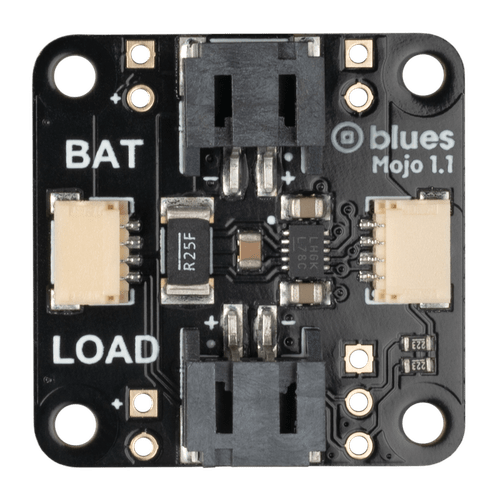
To utilize a Mojo in your product design:
-
Plug the battery into Mojo's
BATconnector, run Mojo'sLOADconnector to your Notecarrier'sLIPOorVBATinput, and connect Mojo to the Notecarrier with a Qwiic cable. Notecard will detect it automatically. -
Zero the counter from your firmware with a card.power request right before you start a power test:
{ "req": "card.power", "reset": true } -
In Notehub, set the device's
_logenvironment variable topower. Notecard then adds a_log.qoNote with the cumulativemilliamp_hoursevery time the modem or GPS powers on or off. Add periodic readings too, if you like:{ "req": "card.power", "minutes": 60 } -
Unplug USB, let the device run on battery for a day or more, then look at the
_log.qoevents from Notehub (or even better, use Notehub IQ to perform the analysis for you).
Here is an example power reading Note from Notehub:
{
  "milliamp_hours": 3.868,
  "text": "modem power off: 0.761231 mAh of energy consumed since modem power on (65 sec)",
  "voltage": 3.3757812
}
Note that the text field reports the charge used since the previous power log,
so a "modem power off" entry covers the whole sync session only when it says
"since modem power on".
Take a closer look at how TJ VanToll validated his firmware changes in Using Blues Mojo to Measure Power Usage. His unoptimized CO₂ monitor measured ~959 mAh/day. But after adding host sleep, sensor power gating, and voltage-variable syncs, and turning off Notecard features he wasn't using, it measured ~15.88 mAh/day. That's a 98% reduction!
Track Deployed Devices with card.voltage
Many people don't realize Notecard can also maintain its own voltage history with the card.voltage API:
{ "req": "card.voltage", "on": true }After sending this request, card.voltage responses include vmin, vmax, and
vavg across up to 30 days of readings. The trend fields appear as history
accumulates: daily after 24 hours, weekly after 7 days, and monthly after
30 days. Each one is the change in a moving-average voltage (e.g. 24-hour,
7-day, or 30-day) across the analyzed window, so a negative value means the
battery is trending down. Here's an example response after 30 days on battery:
{
  "mode": "normal",
  "value": 3.85,
  "hours": 720,
  "vmin": 3.2,
  "vmax": 4.1,
  "vavg": 3.75,
  "daily": -0.05,
  "weekly": -0.3,
  "monthly": -0.8,
  "minutes": 43200
}
Be sure to read the Low-Power Firmware Design guide to learn more.
Summary
Estimating power consumption early is critical in your product design. Start generating estimates right away, even before you pick a battery, an enclosure, or a sync schedule, because that's when the numbers are easiest (and cheapest) to change.
Then measure. Put a Blues Mojo on a prototype, run it on battery, and let real data replace your estimates. Consult the full set of our power tools in the Low-Power Firmware Design guide, and our Power Management and Energy Efficiency guide goes even deeper on the host MCU side.
Happy hacking! 🔋💙
Frequently Asked Questions
How do you calculate battery life for an IoT device?
Add up the charge the device uses in a day, then divide the battery's usable capacity by it. Daily charge is the sleep current times 24 hours, plus each wake's current times its duration times the number of wakes, plus the charge per radio session times the number of sessions. Battery life in days is usable capacity in mAh divided by that daily total in mAh.
How much current does Blues Notecard draw when idle?
Notecard idles at roughly 8 to 18 µA at 5V depending on the model. The
datasheets list about 9 µA for current cellular-only models, about 18 µA for
Cell+WiFi models, and about 8 µA on VIO for Notecard for LoRa. Notecard WiFi
v2 reaches about 10 µA only with its deep sleep mode enabled. Notecard only
reaches its low-power idle state when VUSB is not connected.
How much battery does one cellular sync use?
In our published Mojo measurements on a 5.5V bench supply, creating and syncing one Note cost between about 0.21 and 0.78 mAh depending on the Notecard model. A 12-hour test with a sync every 30 minutes works out to a somewhat higher cost per sync. Signal strength, payload size, and your battery voltage all change the real number, so measure it on your own hardware.
Why does a battery die sooner than the calculated estimate?
Rated capacity assumes a gentle discharge at room temperature. Real devices lose capacity to cold, self-discharge, and voltage sag under the modem's current pulses, and they spend extra energy on weak-signal sessions, retries, firmware updates, GPS, and hosts that never fully sleep. Derate the battery and measure the device to close the gap.
How can I measure the power consumption of a Notecard-based device?
Put a Blues Mojo coulomb counter between the
battery and the device and connect it to the Notecarrier over Qwiic. Notecard
detects it automatically. Read the cumulative milliamp-hours with the
card.power request, or set the _log environment variable to power so
Notecard logs readings to _log.qo every time the modem or GPS powers on and
off. On deployed devices, a card.voltage request with "on": true enables
daily, weekly, and monthly voltage trends, which flag fast-draining units but
don't measure charge directly.