Blues Notecard® Datasheet: NOTE-LORA v2.1
An affordable, embeddable module for low-power LoRa/LoRaWAN connectivity.
Notecard for LoRa is a version of the Blues Notecard that allows for connecting to LoRaWAN gateways. The device follows the same M.2 pinout as the cellular and WiFi Notecards. What's more, Notecard for LoRa uses the same powerful JSON-based programming interface, meaning that developers can easily add LoRa as a deployment option for their IoT solutions, with minimal impact to their existing host applications.

Functional Description
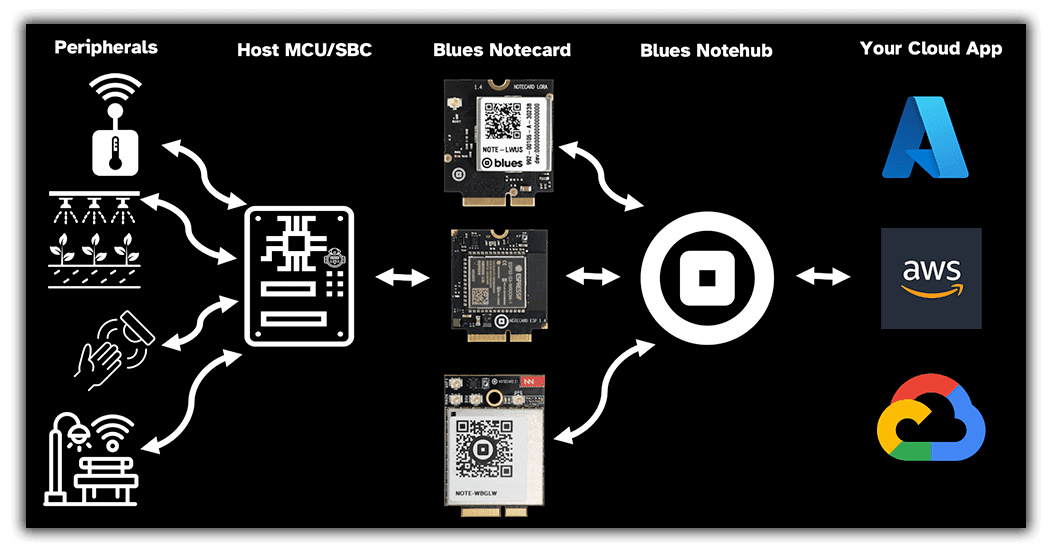
Notecard is an embeddable device-to-cloud data pump designed to remove the complexity and friction inherent in traditional IoT solutions. The Notecard family includes models supporting secure cellular, WiFi, LoRa, or satellite connectivity, enabling rapid development and iteration at a predictable, low cost. With as little as two lines of code on your host MCU, and no external libraries or dependencies, any Notecard model can securely move data from device to cloud.
Specifically, the Notecard NOTE-LORA v2.1 is:
- A drop-in embeddable data storage and transport module for
LoRa IoT products, pumping JSON-formatted or binary data
("Notes") bi-directionally between device and cloud:
- JSON from/to MCU application using I2C, Serial, or USB.
- JSON to/from your cloud app using HTTPS or MQTT.
- JSON is auto-tagged with date/time.
- A removable and field-upgradable 30mm x 35mm system-on-a-module (SOM).
Features
- Low-power. Designed to operate on battery power, be "always-on", maintain time & location, while typically drawing less than ~8µA when idle.
- MCU-agnostic. Will support any MCU or single-board computer as your app processor - even low-memory, 8-bit microcontrollers.
- Simple. Uses a JSON command interface over I2C, UART, or USB. Allows you to connect your 3.3V MCU.
- Power-conscious. Mostly-offline data sync mode for low power.
- Efficient. Battery-powered LoRa without the complexity of managing connections, queues, or storage.
- Integrated. Utilizes an extremely thin cloud infrastructure that directly routes your data to where it belongs: AWS, Azure, GCP, or your own cloud.
- Built for data. Data routing and simple "no code/low code" visual data stream analysis through Notehub.io (SaaS), or host and integrate Notehub functionality into your own app (OSS).
- Embeddable. Castellated edges enable product builder to embed the Notecard for LoRa directly onto a PCB for volume production.
Package Configuration
NOTE-LORA
- Product Name: Notecard for LoRa
- Module: STM32WLE5
- LoRa Frequency: Either 868 MHz (Europe) or 915 MHz (United States). Set by Blues during provisioning.
Module Datasheet
Block Diagram
Notecard for LoRa is packaged using a compact removable form factor, 30mm x 35mm.
3D models and dimensioned drawings for Notecard, along with open hardware designs for Notecarrier boards, are available in the note-hardware GitHub repository, making it a straightforward task to embed the Notecard into a broad variety of host device designs. See Design Files for the files that apply to this Notecard.
The Notecard can interface with the host MCU at 3.3v levels.
| Front | Back |
|---|---|
|  |
Typical Application
As shown below, Notecard is not an application processor and hosts no customer application code. It can be used as a data pump peripheral that is focused on bidirectional, asynchronous, secure data staging and transfer of JSON Notes.
Key Features
-
Low Power Consumption
The Notecard has sophisticated power control and makes heavy use of variable clock speeds. This enables the Notecard to have a typical idle current consumption of ~8µA, while still supporting active UART and I2C communication.
Power Information
Notecard for LoRa is powered by the logic voltage supply (VIO_P), provided by
the Notecarrier or host system; it must be 3.3V. Because this supply powers the
STM32WL module and the LoRa radio, it should be designed with a 150mA budget
allocated to the Notecard, and PCB traces for VIO_P and GND should be
designed to handle that current.
Unlike cellular and WiFi Notecards, the VMODEM_P pins on Notecard for LoRa do
not power the radio. VMODEM_P is used only to monitor the supply/battery
voltage (for example, in response to a card.voltage request). It presents a
negligible (sub-µA) load, and any voltage in the range of 2.5V to 5.5V may be
provided.
Notecard for LoRa typically draws ~8µA on VIO_P when sitting idle waiting for
a request from the host MCU, however the Notecard current draw increases when
the LoRa radio is active (consult the
STM32WLE5 datasheet
for details). The module also draws tens of mA when the CPU is
performing session encryption.
| Pin Name | Direction | Pin Numbers | Usage |
|---|---|---|---|
| GND | -- | 3,5,6,11,18,33,39,45,51,57,71,73 | Ground |
| VIO_P | IN | 2,4 | 3.3V @ 150mA (powers the module and LoRa radio) |
| VUSB | IN | 13 | USB Serial proxy for "line power", with respect to dynamic line voltage detection |
| VMODEM_P | IN | 70,72,74 | 2.5V to 5.5V, battery-voltage monitoring only (negligible draw) |
Reset and Loss of Power
 warning
A power-loss event occurs whenever the Notecard loses power on VIO_P, or the
Notecard's NRST pin is pulled low. (On Notecard for LoRa, VMODEM_P is a
battery-monitoring input only and does not power the Notecard.)
Upon recovering from any power-loss event, the Notecard initiates a procedure to ensure filesystem integrity. The Notecard also conducts a procedure upon first connection to Notehub after power loss to ensure consistency between Notecard's file system and Notehub's replica copy of those files. This verification procedure is done to protect and ensure the integrity of your product, and you should expect additional use of network bandwidth when these rare events occur.
It is the responsibility of every product designer to ensure that designs
utilizing Notecard provide constant power to VIO_P, at the cost
of as little as 8 µA, so as to ensure that power-loss events do not occur as a
matter of course from the perspective of the Notecard.
If repeated power failures are expected and unavoidable in a product's use, designs must incorporate a small battery or lithium ion capacitor to provide backup power, and the Notecard firmware should be configured to enter a quiescent state when operating on its backup supply.
Frequent power-loss events will result in the voiding of the Notecard warranty. In addition, since repeated Notecard resets can be indistinguishable from "denial of service" attacks on the Notehub, Blues also reserves the right to deny access to devices that exhibit such behavior.
Antenna Requirements
Notecard for LoRa requires usage of an external antenna attached to its u.FL connector. The external antenna must support a frequency band appropriate for the region-specific LoRa frequency in use.
Cellular Service
This section does not apply to Notecard for LoRa.
Pin Information
Pin Definitions
| Pin Name | Pin Description |
|---|---|
| ATTN_P | Attention pin (requires protection) |
| AUX_RX | Auxiliary UART receive (requires protection) |
| AUX_TX | Auxiliary UART transmit (requires protection) |
| AUX1 | Auxiliary GPIO pin 1 |
| AUX2 | Auxiliary GPIO pin 2 |
| AUX3 | Auxiliary GPIO pin 3 |
| AUX4 | Auxiliary GPIO pin 4 |
| BOOT | Test/debug pin used to force Notecard into its bootloader |
| GND | Ground |
| NC | No connection (must be left open) |
| NRST | Active-low (not) reset* |
| RSVD | Reserved for internal use (electrically connected and must be left open) |
| RX_P | UART receive (requires protection) |
| SCL_P | I2C clock (requires protection) |
| SDA_P | I2C data (requires protection) |
| TX_P | UART transmit (requires protection) |
| USB_DN | USB data negative |
| USB_DP | USB data positive |
| VIO_P | I/O Voltage (requires protection)* |
| VMODEM_P | Voltage supply/battery monitoring input* |
| VUSB | USB Active indicator from 3V3 to 5V |
* See the power information section for important product design considerations related to reset and loss of power conditions.
Pin Description
Notecard M.2 Key E, Edge Connector Pinout
| Pin # | Pin Name | Func. Interface | Func. Interface | Pin Name | Pin # |
|---|---|---|---|---|---|
| 1 | NC | Power | VIO_P | 2 | |
| 3 | GND | Power | Power | VIO_P | 4 |
| 5 | GND | Power | Power | GND | 6 |
| 7 | USB_DP | USB Serial | NC | 8 | |
| 9 | USB_DN | USB Serial | NC | 10 | |
| 11 | GND | Power | NC | 12 | |
| 13 | VUSB | USB Serial | NC | 14 | |
| 15 | NC | NC | 16 | ||
| 17 | NC | Power | GND | 18 | |
| 19 | NC | NC | 20 | ||
| 21 | NC | NC | 22 | ||
| 23 | NC | NC | 24 | ||
| 25 | NC | NC | 26 | ||
| 27 | NC | NC | 28 | ||
| 29 | NC | NC | 30 | ||
| 31 | NC | NC | 32 | ||
| 33 | GND | Power | NC | 34 | |
| 35 | NC | NC | 36 | ||
| 37 | NC | NC | 38 | ||
| 39 | GND | Power | I2C Serial | SCL_P | 40 |
| 41 | NC | I2C Serial | SDA_P | 42 | |
| 43 | NC | NC | 44 | ||
| 45 | GND | Power | Auxiliary Ports | AUX1 | 46 |
| 47 | NC | Auxiliary Ports | AUX2 | 48 | |
| 49 | NC | Auxiliary Ports | AUX3 | 50 | |
| 51 | GND | Power | Auxiliary Ports | AUX4 | 52 |
| 53 | RSVD | Attention | ATTN_P | 54 | |
| 55 | RSVD | NC | 56 | ||
| 57 | GND | Power | Auxiliary Ports | AUX_RX | 58 |
| 59 | NC | Auxiliary Ports | AUX_TX | 60 | |
| 61 | NC | UART Serial | RX_P | 62 | |
| 63 | RSVD | UART Serial | TX_P | 64 | |
| 65 | BOOT | Bootloader | NC | 66 | |
| 67 | NRST | Reset | NC | 68 | |
| 69 | NC | Power | VMODEM_P | 70 | |
| 71 | GND | Power | Power | VMODEM_P | 72 |
| 73 | GND | Power | Power | VMODEM_P | 74 |
| 75 | NC |
Notecard for LoRa v2.1 Castellated Edge Pinout
| Pin # | Pin Name | Func. Interface | Func. Interface | Pin Name | Pin # |
|---|---|---|---|---|---|
| 1 | NC | NC | 19 | ||
| 2 | AUX_TX | Auxiliary Ports | NC | 20 | |
| 3 | AUX_RX | Auxiliary Ports | NC | 21 | |
| 4 | NC | NC | 22 | ||
| 5 | AUX1 | Auxiliary Ports | NC | 23 | |
| 6 | AUX2 | Auxiliary Ports | I2C Serial | SCL | 24 |
| 7 | AUX3 | Auxiliary Ports | I2C Serial | SDA | 25 |
| 8 | AUX4 | Auxiliary Ports | NC | 26 | |
| 9 | RX | UART Serial | Attention | ATTN | 27 |
| 10 | TX | UART Serial | NC | 28 | |
| 11 | SWDIO | NC | 29 | ||
| 12 | SWCLK | USB Serial | VUSB | 30 | |
| 13 | LED_BUSY | USB Serial | USB_DP | 31 | |
| 14 | NRST | Reset | USB Serial | USB_DN | 32 |
| 15 | VIN | Power | Power | VIO | 33 |
| 16 | VIN | Power | Power | VIO | 34 |
| 17 | GND | Power | Power | GND | 35 |
| 18 | GND | Power | Power | GND | 36 |
Link: Digi-Key part number of the connector - Both Digi-Key and Mouser have pictures for this part number that show a component with a different key, but both have links to datasheet/drawing/CAD models.
 note
noteAll pins whose Functional Interface is marked "Power" must be connected.
All pins named NC have no connection on the Notecard and must be left open.
All pins named RSVD are reserved for internal use. These pins are
electrically connected on the Notecard and MUST be left open. Furthermore, any
pin not used in a design MUST also be left open.
BOOT (pin 65) is a test/debug pin, not a functional interface. It is not
required for normal operation and should be left open, but routing it to a test
point on your carrier board makes it possible to recover a Notecard whose
firmware update was interrupted. See Bootloader for details.
Those pins ending with _P may be optionally protected from anomalous external
conditions on some Notecarrier designs, depending upon use-case specific
requirements.
Technical Details
Host Microcontroller API
Notecard supports a rich, simple API whose syntax is standard JSON. The
developer can communicate requests to Notecard, generally by using little more
than printf functions available in most programming languages.
Serial Communication
JSON requests and responses (the Notecard's Application Programming Interface "API") may be sent over any of the following interfaces:
- USB Serial Interface
- UART Serial Interface
- I2C Interface
API Reference
For API usage, names, and parameters, please refer to the Notecard API Reference.
USB Serial Interface
The USB Serial Interface appears to the host as a USB 2.0 Full Speed CDC device. You can access it from Linux, Windows, or macOS without a device driver using terminal emulation software. Newline-delimited JSON requests may be sent directly as UTF-8 text over this port, or you may use the open-source Blues libraries for C, Python, Go, and Arduino.
| Pin Name | Direction | Pin Number | Usage |
|---|---|---|---|
| USB_DN | I/O | 9 | USB D- data signal |
| USB_DP | I/O | 7 | USB D+ data signal |
| VUSB | IN | 13 | +5V from USB |
| GND | I/O | 11 | Ground from USB |
UART Serial Interface
The UART Serial Interface operates at VIO_P at a fixed baud rate of 9600 using
eight data bits, no parity bit, and one stop bit. Newline-delimited JSON
requests may be sent directly as UTF-8 text over this port, or you may use the
open-source Blues libraries for C, Python, Go, and Arduino.
| Pin Name | Direction | Pin Number | Usage |
|---|---|---|---|
| RX_P | IN | 62 | Receive data signal |
| TX_P | OUT | 64 | Transmit data signal |
I2C Interface
The Notecard acts as an I2C secondary device operating at VIO_P, and it
implements a simple
Serial-over-I2C protocol.
You can access it from an embedded host using open-source Blues
libraries for C, Python, Go, and Arduino.
| Pin Name | Direction | Pin Number | Usage |
|---|---|---|---|
| SCL_P | IN | 40 | I2C clock |
| SDA_P | I/O | 42 | I2C data |
Host Microcontroller Hardware Interface
Attention Interrupt
Using software, you can optionally configure Notecard to use the ATTN output
pin to:
- Inform the host MCU of certain asynchronous events (such as incoming data availability) in an interrupt-driven manner rather than just polling.
- Place the host MCU into a power-off sleep state and wake it back up again.
| Pin Name | Direction | Pin Number | Usage |
|---|---|---|---|
| ATTN_P | OUT | 54 | Attention pin |
noteThis pin operates at VIO_P. If it is unused it can be left disconnected.
Auxiliary Ports
The AUX1-4 pins operate at VIO_P and can be configured in software to operate
in several optional modes, such as GPIO mode, monitor mode, and LED/NeoPixel
mode. See
card.aux for the full
list of modes and which Notecards support them, and
Working with the Notecard AUX Pins
for usage examples. If these pins are unused, they can be left disconnected.
| Pin Name | Direction | Pin Number | Usage |
|---|---|---|---|
| AUX_RX | IN | 58 | Auxiliary UART receive |
| AUX_TX | OUT | 60 | Auxiliary UART transmit |
| AUX1 | I/O | 46 | General Purpose IO |
| AUX2 | I/O | 48 | General Purpose IO |
| AUX3 | I/O | 50 | General Purpose IO |
| AUX4 | I/O | 52 | General Purpose IO |
Onboard LEDs
Most Notecards have two small LEDs on the top of the module, each driven by a different source.
The red LED is controlled by Notecard firmware. It blinks at boot, lights while
the Notecard is processing a request or writing to flash, and stays on
continuously while the Notecard is in SoftAP mode. Its behavior can be adjusted
with the mode argument to
card.io.
On Notecards with a cellular modem, the green LED is driven by the modem's network status output. It reflects the modem's own state, so it is dark while the modem is powered down, and its blink pattern is defined by the modem manufacturer.
Reset
Use of this pin is optional. If the host system has a global reset line, caution should be used when connecting this pin to the host system's reset because the Notecard may independently pull the line low in software. Restrictions on this pin are:
- If this pin is not used, it must remain not connected (
NC). - The pin is active-low. It must be held low for at least 350 ns for a clean reset.
- This pin must never be pulled-up. A pull-up would interfere with the Notecard's own internal watchdog timer and thus will prevent reliable operations.
- Some Notecarriers may invert this signal to be active-high.
| Pin Name | Direction | Pin Number | Usage |
|---|---|---|---|
| NRST | I/O | 67 | Active-low reset |
Bootloader
BOOT (pin 65) is a test/debug pin that forces Notecard into its bootloader
instead of running its firmware. Its primary use is recovering a Notecard whose
firmware update was interrupted, leaving it unable to boot normally. This pin
plays no part in normal operation and use of it is optional.
To enter the bootloader, hold BOOT at VIO_P while resetting the Notecard,
then release NRST (pin 67) before releasing BOOT. Notecard will stay in its
bootloader, ready to accept firmware over the
USB serial interface.
Restrictions on this pin are:
- If this pin is not used, it must remain not connected (
NC). - Never apply a voltage above
VIO_Pto this pin. - Never hold this pin
HIGHin normal operation, or Notecard will enter its bootloader on every reset rather than running its firmware.
| Pin Name | Direction | Pin Number | Usage |
|---|---|---|---|
| BOOT | IN | 65 | Force Notecard into its bootloader on reset |
 tip
tipFor the step-by-step procedure on using a Notecarrier to recover a Notecard, see Recovering a Bricked Notecard.
Network Communication Behavior
The Notecard includes a built-in connection to Notehub.io and communicates through any available (and in-range) LoRaWAN gateway and LoRaWAN Network Server (LNS) with a secure connection to Notehub.io. Outbound connections communicate with Notehub via the LNS for provisioning and device authentication. By default, the connection is unidirectional, but can operate bi-directionally, if needed.
Specifications
General Characteristics
| Description | Value |
|---|---|
| Dimensions | 30mm x 35mm |
| Weight | 3 grams |
Electrical Characteristics
Absolute Maximum Ratings
| Description | Minimum | Maximum | Unit |
|---|---|---|---|
| Storage temperature | -40 | 90 | °C |
| Ambient operating temperature | -40 | 85 | °C |
DC Characteristics
| Description | Minimum | Typical | Maximum | Unit |
|---|---|---|---|---|
| VIO Supply Voltage | 3.3 | V | ||
| VIO Operating Current | 150 | mA | ||
| VMODEM Monitoring Voltage | 2.5 | 5.5 | V |
Ordering Information
Design Files
3D models and dimensioned drawings for every Notecard are maintained in the note-hardware GitHub repository. Use them to check how a Notecard fits on your host board and inside your enclosure.
Here are the design files available for the NOTE-LORA v2.1:
- 3D model (
.stp) — a STEP 3D model. Import it into mechanical CAD to check fit on your host board and inside your enclosure.
Certifications
CE
For the EU variant of Notecard for LoRa.
CE certification indicates that a product complies with the essential requirements of relevant European health, safety, and environmental protection legislation. It is a mandatory conformity mark for products sold within the European Economic Area (EEA).
| Certification | Date |
|---|---|
| EN 301 489-1 V2.2.3 | August 2024 |
| EN 301 489-3 V2.3.2 | August 2024 |
| EN 55032:2015+A11:2020, Class B | August 2024 |
| EN 55035:2017+A11:2020 | August 2024 |
| EN IEC 62311:2020 | August 2024 |
| EN 300 220-1 V3.1.1 | August 2024 |
| EN 300 220-2 V3.2.1 | August 2024 |
FCC
For the US variant of Notecard for LoRa.
FCC certification indicates that a product complies with the regulations set forth by the Federal Communications Commission (FCC) in the United States. This certification ensures that electronic devices do not emit electromagnetic interference that could disrupt other electronic devices and communication systems.
| Certification | Date |
|---|---|
| 47 CFR FCC Part 15, Subpart B, Class B | August 2024 |
| 47 CFR Part 2, Section 2.1091 | August 2024 |
| 47 CFR FCC Part 15, Subpart C (Section 15.249) | August 2024 |
ISED
For the US variant of Notecard for LoRa.
ISED/ISEDC certification is issued by Innovation, Science and Economic Development Canada (ISEDC), formerly known as Industry Canada (IC). This certification ensures that electronic devices comply with Canadian regulations regarding radio frequency (RF) emissions and electromagnetic interference (EMI).
| Certification | Date |
|---|---|
| RSS-210 Issue 10 | October 2024 |
| RSS-Gen Issue 5 + Amendment 2 | October 2024 |
| RSS-102 Issue 5 + Amendment 1 | October 2024 |
Board Errata
Terms and Conditions
Visit Blues Hardware Terms & Conditions
Security and Vulnerability Scanning
As a part of our regular audit and scanning process, Blues Inc. performs full vulnerability scanning every six months. Any identified vulnerabilities will be analyzed, reported, and patched in a timely fashion, where appropriate.
Revision History
| Author | Date | Summary |
|---|---|---|
| Ray Ozzie | 2019-2020 | Document drafted |
| John Wiedey | 2020 | Various improvements |
| Sean Taylor | 2020 | Various improvements |
| Zachary J. Fields | 11 SEP 2020 | Updated information and translated to markdown |
| Brandon Satrom | 13 APR 2021 | Updated Country list based on carrier audit |
| Carlton Henderson | 12 JUL 2021 | Update coverage information |
| Carlton Henderson | 12 JUL 2021 | Fix block diagram photo |
| Brandon Satrom | 11 NOV 2021 | Added Certification Dates |
| Brandon Satrom | 07 JAN 2022 | Added RoHS Certification Dates |
| Brandon Satrom | 15 FEB 2022 | Add WiFi Notecard Datasheet |
| Rob Lauer | 25 AUG 2022 | Added updated certification data |
| Rob Lauer | 27 OCT 2022 | Update country coverage information |
| Rob Lauer | 13 JAN 2023 | Added RF performance information |
| Rob Lauer | 2 FEB 2023 | Warning re: STM32 light sensitivity |
| Kimball Johnson | 21 SEP 2023 | Updated for new Cell+WiFi, LoRa, and WiFi Notecards |
| Rob Lauer | 23 OCT 2023 | Update and clarify power consumption values |
| Rob Lauer | 31 JAN 2024 | Update Notecard for LoRa datasheet details |
| Rob Lauer | 16 APR 2024 | Updated for new Cellular (black PCB) Notecards, MB Cellular Notecards, and Notecard XP |
| Rob Lauer | 6 JUN 2024 | Added cell band support for Cellular Notecards |
| Rob Lauer | 23 JUL 2024 | Update pin definitions |
| TJ VanToll | 24 SEP 2024 | Adding Notecard for LoRa v2.1 information |
| Rob Lauer | 01 NOV 2024 | Adding Notecard for LoRa v2.1 castellated pin info |
| Rob Lauer | 06 NOV 2024 | Added errata for Notecard Cell+WiFi |
| Brandon Satrom | 06 DEC 2024 | Expanded reset and loss of power guidance |
| Rob Lauer | 20 DEC 2024 | Added PTCRB certifications for WBNAN, NBNAN, NBGLN |
| Rob Lauer | 5 MAR 2025 | Update AUX5 to AUX_CHARGING |
| Rob Lauer | 22 MAY 2025 | Fix labelling of NC pins |
| Rob Lauer | 13 JUN 2025 | Update certifications |
| Rob Lauer | 21 JUL 2025 | Update certifications for WBNAN, NBNAN, NBGLN |
| Rob Lauer | 28 JUL 2025 | Update certifications for all Notecard SKUs |
| Rob Lauer | 17 NOV 2025 | Add FCC and IC IDs for all Notecard Cellular SKUs |
| TJ VanToll | 21 JAN 2026 | Added Notecard for Skylo |
| Rob Lauer | 23 JUL 2026 | Accuracy review vs. hardware design files |
| Rob Lauer | 03 AUG 2026 | Document the BOOT pin (65) on all Notecard SKUs |
| TJ VanToll | 14 AUG 2026 | Adding new Telit SKUs WBEXWT & WBNAWT |
| Rob Lauer | 18 AUG 2026 | Expand countries not included |
| Rob Lauer | 18 AUG 2026 | Added manufacturer-reported GNSS accuracy figures |
| Rob Lauer | 22 SEP 2026 | Added Design Files section linking 3D models and drawings |
Contact Information
Blues Inc.
https://blues.com
50 Dunham Ridge Suite 1650
Beverly, MA 01915
support@blues.com
