Building a Simple Asset Tracker
Introduction
This sample demonstrates how to build a compact, self-contained asset tracker using the Blues Notecarrier CX and the Blues Notecard Cell+WiFi. The sample leverages the Notecard Cell+WiFi's built-in GNSS module, keeping the hardware footprint small and the setup straightforward.
The Notecarrier CX is based on the Notecarrier X and adds an onboard STM32L433 host MCU, the same part used on Blues Cygnet. This means you get a carrier board with an onboard host MCU out of the box, with no external microcontroller required. For a simple asset tracker, the Notecard handles GPS acquisition and cloud synchronization autonomously. The host MCU can be used to configure the Notecard on first boot or to add application logic over time.
Wireless Connectivity with Blues
This sample is built around the Blues Notecard and Blues Notehub.
The Blues Notecard is the easiest way for developers to add secure, robust, and affordable pre-paid wireless connectivity to their microcontroller or single-board computer of choice. Notecard is a System-on-Module (SoM) that combines pre-paid data, low-power hardware (~8μA–18μA when idle), and secure communications. It acts as a device-to-cloud data pump to communicate with the Blues cloud service Notehub.
Notehub is the Blues cloud service for routing Notecard-provided data to third-party cloud applications, deploying OTA firmware updates, and securely managing fleets of Notecards. Notehub allows for secure communications between edge devices and the cloud without certificate management or manual provisioning of devices.
General Information
System Hardware
This article’s pattern can be implemented with any Notecard Cellular or Notecard Cell+WiFi, any host microcontroller, and any battery. For demonstration purposes, this article uses the following hardware.
| Component | Purpose |
|---|---|
| Blues Notecard Cell+WiFi | Wireless connectivity module with built-in GNSS for location tracking. |
| Blues Notecarrier CX | Carrier board with onboard STM32L433 host MCU (Cygnet), M.2 Notecard socket, and LiPo connector. |
| LiPo Battery | Power source. |
List of Acronyms
| Acronym | Definition |
|---|---|
| MCU | Microcontroller |
| SoM | System-on-Module |
| GPS | Global Positioning System, a satellite-based radio navigation system |
| GNSS | Global Navigation Satellite System, a generic term for any satellite constellation that provides positioning and timing services |
Summary
The Notecard Cell+WiFi includes a built-in GNSS receiver, making it possible to build an asset tracker without any external GPS module. The key design consideration is that the Notecard's cellular modem and its built-in GPS cannot operate simultaneously. The Notecard handles this constraint automatically: it alternates between acquiring a GPS fix and connecting to Notehub to sync the location data.
For applications where real-time, sub-minute location updates are not required, this periodic approach is an ideal fit. The Notecard autonomously manages the GPS/cellular duty cycle, and the Notecarrier CX's onboard Cygnet MCU can be used to configure the Notecard on first boot, add custom sensor readings alongside the location data, or enter a low-power sleep state to extend battery life.
 note
noteIf your use case demands simultaneous cellular connectivity and GPS sampling—for example, a vehicle tracker that must upload location data continuously with minimal latency—consider using an external GPS module instead. See the Continuous Asset Tracking with External GPS sample for that approach.
Requirements
- A Notehub project to receive the location data. Create a free project at notehub.io.
Technical Implementation
 tip
tipLet AI write your firmware. Blues Expert MCP connects your AI coding assistant (Claude Code, GitHub Copilot, Cursor) directly to our API docs, providing live request validation and firmware best practices for Arduino, C, Zephyr, and Python. Install the Blues Expert MCP →
Hardware Setup
Begin by assembling the hardware:
- Insert the Notecard Cell+WiFi into the M.2 connector on the Notecarrier CX and secure it with the included screw.
- Connect the cellular antenna (its lead is labeled
LTE) to theMAINu.FL connector on Notecard. - Connect the GPS/GNSS antenna to the
GPSu.FL connector on the Notecard. - Connect a LiPo battery to the JST-PH connector on the Notecarrier CX.
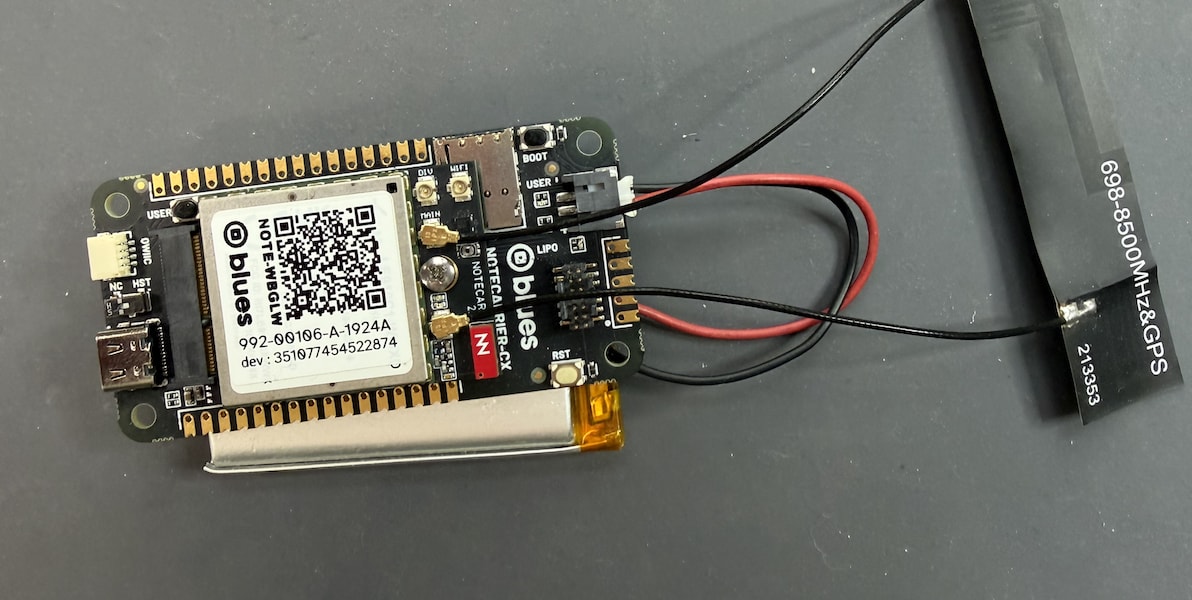
noteFor optimal GPS performance, place the GPS/GNSS antenna where it has a clear, unobstructed view of the sky. A metallic enclosure or indoor deployment will significantly reduce GPS signal quality and acquisition speed.
Notecard Configuration
The following Notecard API requests configure the device for periodic asset tracking. You can send these requests using the In-Browser Terminal, the Notecard CLI, or programmatically from the Cygnet using host firmware (see the Host Firmware section below). Notecard saves these settings to flash, so you only need to send them once.
Step 1: Associate the Notecard with a Notehub project.
The hub.set API
links the Notecard to your Notehub project and sets the synchronization
behavior. periodic mode is used here so the Notecard alternates between
GPS acquisition and cellular sync, since they cannot run simultaneously.
The vinbound and voutbound arguments use
voltage-variable
sync intervals to reduce modem usage when the battery is low, extending
field life.
{
  "req": "hub.set",
  "product": "<your-product-uid>",
  "mode": "periodic",
  "vinbound": "usb:10;high:60;normal:180;low:360;dead:0",
  "voutbound": "usb:10;high:60;normal:180;low:360;dead:0"
}J *req = NoteNewRequest("hub.set");
JAddStringToObject(req, "product", "<your-product-uid>");
JAddStringToObject(req, "mode", "periodic");
JAddStringToObject(req, "vinbound", "usb:10;high:60;normal:180;low:360;dead:0");
JAddStringToObject(req, "voutbound", "usb:10;high:60;normal:180;low:360;dead:0");
NoteRequest(req);Step 2: Inform the Notecard of the battery type.
The card.voltage API tells the Notecard what kind of power source is in use so it can correctly interpret voltage readings for the voltage-variable intervals set above.
{
  "req": "card.voltage",
  "mode": "lipo"
}J *req = NoteNewRequest("card.voltage");
JAddStringToObject(req, "mode", "lipo");
NoteRequest(req);Step 3: Configure the GPS location sampling interval.
The card.location.mode API
tells the Notecard how often to power on its GPS receiver and attempt to
acquire a location fix. A 5-minute interval (300 seconds) is a reasonable
default for a battery-powered tracker.
{
  "req": "card.location.mode",
  "mode": "periodic",
  "seconds": 300
}J *req = NoteNewRequest("card.location.mode");
JAddStringToObject(req, "mode", "periodic");
JAddNumberToObject(req, "seconds", 300);
NoteRequest(req);Step 4: Enable location tracking.
The card.location.track API
instructs the Notecard to automatically record each GPS fix to the
_track.qo system Notefile.
Setting heartbeat with "hours": 24 adds a _track.qo Note once a day even
when the asset is stationary, so you know the device is still alive.
{
  "req": "card.location.track",
  "start": true,
  "heartbeat": true,
  "hours": 24
}J *req = NoteNewRequest("card.location.track");
JAddBoolToObject(req, "start", true);
JAddBoolToObject(req, "heartbeat", true);
JAddNumberToObject(req, "hours", 24);
NoteRequest(req);Host Firmware
Host firmware is not required for basic asset tracking—the Notecard operates autonomously once configured. However, running firmware on the Notecarrier CX's onboard Cygnet MCU is useful for sending the configuration commands programmatically on first boot, rather than manually via the In-Browser Terminal.
The firmware below uses the
Notecard Arduino library
to initialize the Notecard and send the four configuration requests described
above. If you haven't flashed the Notecarrier CX before, start with the
Notecarrier CX Quickstart. To see the
sketch's Serial output, power the board over USB with the DIP switch next to
the USB-C connector in the HST position.
Firmware
#include <Notecard.h>

#define myProductUID "<your-product-uid>"

Notecard notecard;

void setup() {
  Serial.begin(115200);
  delay(1000);

  notecard.begin();
  notecard.setDebugOutputStream(Serial);

  // Associate the Notecard with a Notehub project and enable periodic sync.
  J *req = notecard.newRequest("hub.set");
  if (req) {
    JAddStringToObject(req, "product", myProductUID);
    JAddStringToObject(req, "mode", "periodic");
    JAddStringToObject(req, "vinbound", "usb:10;high:60;normal:180;low:360;dead:0");
    JAddStringToObject(req, "voutbound", "usb:10;high:60;normal:180;low:360;dead:0");
    notecard.sendRequest(req);
  }

  // Inform the Notecard that it is running on a LiPo battery so it can
  // correctly interpret the voltage-variable sync intervals above.
  req = notecard.newRequest("card.voltage");
  if (req) {
    JAddStringToObject(req, "mode", "lipo");
    notecard.sendRequest(req);
  }

  // Sample GPS every 5 minutes.
  req = notecard.newRequest("card.location.mode");
  if (req) {
    JAddStringToObject(req, "mode", "periodic");
    JAddNumberToObject(req, "seconds", 300);
    notecard.sendRequest(req);
  }

  // Record each GPS fix to _track.qo.
  // Add a heartbeat Note every 24 hours even when the asset is not moving.
  req = notecard.newRequest("card.location.track");
  if (req) {
    JAddBoolToObject(req, "start", true);
    JAddBoolToObject(req, "heartbeat", true);
    JAddNumberToObject(req, "hours", 24);
    notecard.sendRequest(req);
  }

  Serial.println("Asset tracker configured.");
}

void loop() {
  // The Notecard autonomously manages GPS sampling and Notehub sync.
  // The Cygnet can remain idle here, or be extended with additional sensors
  // or put to sleep using card.attn to reduce power consumption.
  delay(60000);
}
To further reduce power consumption, the host MCU can be put to sleep between
wakeups using the card.attn request. On the Notecarrier CX this means
jumpering ATTN to a host GPIO and entering STOP2, following the
deep-sleep pattern
in the Putting a Host to Sleep Between Sensor Readings sample.
Expected Results
After the device is powered on it will:
- Complete an initial sync with Notehub. GPS is not enabled until this first sync succeeds.
- Begin periodic GPS acquisition every 5 minutes, when in motion.
- Sync location data to Notehub according to the configured
voutboundvalue.
Location events appear in Notehub under the _track.qo Notefile.

Notehub adds the location to each event in its best_* fields.
{
  "best_location_type": "gps",
  "best_lat": 42.7522525,
  "best_lon": -84.74562109375,
  "best_location": "Grand Ledge MI",
  "best_country": "US",
  "best_timezone": "America/Detroit",
  "best_location_when": 1704717310
}With the current configuration, _track.qo Notes are synced to Notehub
according to the configured voutbound schedule—every
10 minutes on USB power, every 60 minutes on high battery, and every 3 hours
on normal battery.
You can reduce these intervals in the hub.set
request for more frequent uploads, but intervals under 5 minutes are not
recommended when using the Notecard's built-in GPS.
Because cellular and GPS
cannot run simultaneously, very short intervals leave insufficient time for
the Notecard to alternate between acquiring a fix and connecting to sync. If
your use case requires sub-5-minute location updates, consider using an
external GPS module instead—see the
Continuous Asset Tracking with External GPS
sample.
Potential Issues
- No GPS fix: If the Notecard cannot acquire a GPS fix, confirm the GNSS antenna is properly connected and the device has a clear view of the sky. GPS acquisition can take several minutes in a new location. See Diagnosing GPS Issues on the Notecard for more information.
- No cellular connection: Notecard must complete an initial sync with Notehub before GPS is enabled. Verify the cellular antenna is connected and that the device is within cellular coverage. See Diagnosing Cellular Connectivity Issues for more information.
